
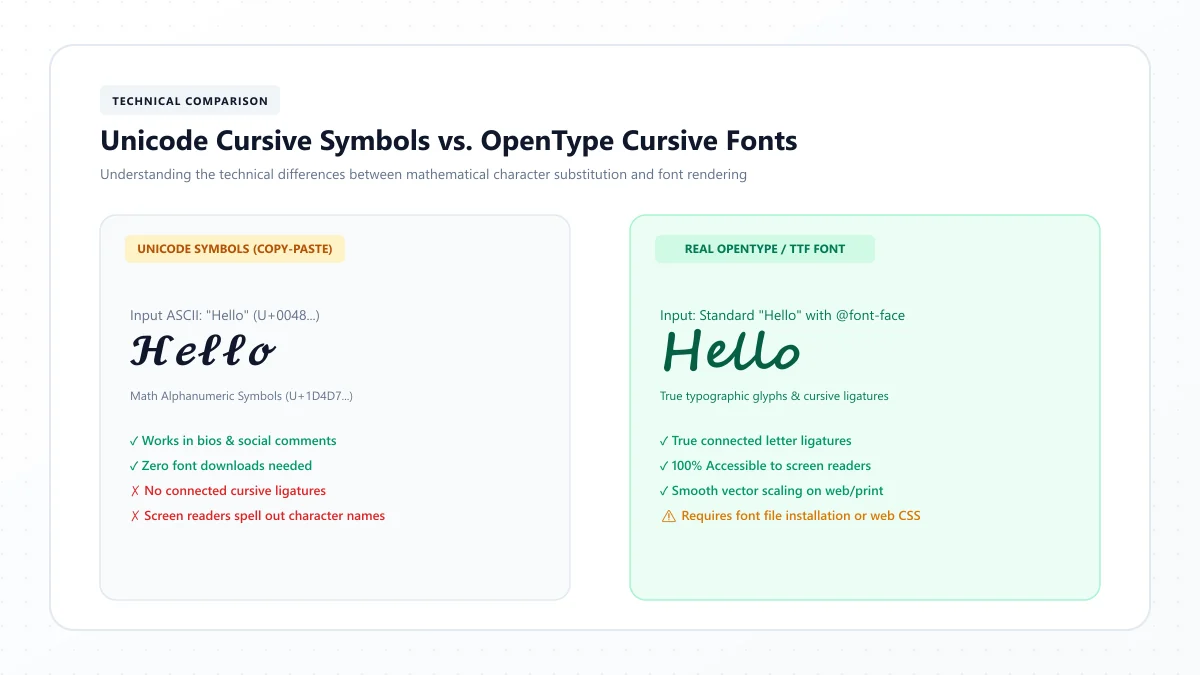
Have you ever copied beautiful cursive text from a font generator, pasted it into Instagram or Discord, and noticed that the letters looked different?
Maybe you typed hello and received something like 𝓗𝓮𝓵𝓵𝓸. It looked like elegant handwriting, even though you hadn't installed a new font.
But when you pasted the same text into another app, the curves changed, some letters looked inconsistent, or a few symbols turned into empty boxes.
Why does this happen?
The answer comes down to an important difference: Unicode cursive text and real cursive fonts are not the same thing.
Unicode cursive generators replace ordinary letters with special characters that have script-like appearances. Real cursive fonts, on the other hand, change how ordinary text is displayed without usually changing the underlying letters.
Both can produce beautiful lettering, but they work differently.
In this guide, we'll explain exactly how Unicode cursive works, why copy-and-paste fonts look different across devices, how genuine typefaces work, and when you should use each option.
You'll also learn how to troubleshoot broken cursive text, understand character limits, and choose a more accessible approach for your next project.
Unicode Cursive vs. Real Fonts: The Quick Answer
The main difference is simple:
Unicode cursive changes the characters. A real cursive font changes their visual appearance.
For example:
Normal text: Hello
Unicode cursive: 𝓗𝓮𝓵𝓵𝓸
Unicode bold: 𝗛𝗲𝗹𝗹𝗼
In the first example, hello contains ordinary Latin letters.
In the decorative examples, the text contains different Unicode characters that resemble styled letters.
A real cursive font works differently.
If you type hello in Microsoft Word and apply a font such as Great Vibes, the underlying letters ordinarily remain H, e, l, l and o. Word simply uses a different typeface to display them.
That is why you can generally paste Unicode cursive into a compatible social media bio, but you cannot paste a Word font style into every plain-text field.
Quick comparison
Feature | Unicode cursive text | Real cursive font |
|---|---|---|
What changes? | The characters | The glyph appearance |
Example | 𝓗𝓮𝓵𝓵𝓸 | Hello displayed in a script typeface |
Requires font installation by the user? | Not to generate the text | Depends on the application and font |
Copyable into plain-text fields? | Often, if characters are accepted | Styling usually isn't preserved |
Looks identical everywhere? | No | Also depends on font availability or embedding |
Best for | Short decorative bios and messages | Documents, invitations and graphic design |
Accessibility | Can be problematic | Usually preferable with ordinary underlying text |
Typography controls | Limited | Often extensive |
The right choice depends on whether you want portable decorative characters or controlled typography.
What Is Unicode Cursive Text?
Unicode is a character-encoding standard that assigns unique values, called code points, to characters used in digital text.
It covers ordinary letters, punctuation, mathematical symbols, emoji, and characters from writing systems around the world.
Unicode isn't a font.
It defines the characters themselves.
Fonts are responsible for turning those characters into visible shapes on a screen or printed page.
Where do cursive Unicode letters come from?
Many copy-and-paste cursive generators use characters from the Unicode Mathematical Alphanumeric Symbols collection, along with related Letterlike Symbols.
These include styles commonly described as:
- Mathematical script
- Mathematical bold script
- Mathematical italic
- Mathematical bold
- Fraktur
- Double-struck
- Sans-serif mathematical lettering
These character sets were encoded primarily for mathematical and technical notation.
For example, mathematical writing may need to distinguish a regular letter from a bold or script version because each can represent something different.
Using these characters to imitate decorative fonts in everyday social media text is a secondary use, not the original purpose of the character sets.
Example: Three different characters
Consider these forms of the letter A:
Ordinary A: A
Mathematical script A: 𝒜
Mathematical bold script A: 𝓐
They may look like different font styles, but they are different characters.
That distinction is why decorative Unicode can travel through copy and paste without carrying a font-formatting setting.
What Is a Real Cursive Font?
A real cursive font is a font resource containing glyph designs that an application uses to display text.
Common font formats include TrueType and OpenType, often distributed as .ttf and .otf files.
A genuine script typeface might use connected letters, elaborate capitals, decorative swashes, and carefully designed letter spacing.
Examples include:
Great Vibes — formal, expressive calligraphy.
Allura — graceful handwritten script.
Dancing Script — relaxed, friendly handwriting.
Sacramento — restrained monoline-style lettering.
Alex Brush — expressive brush calligraphy.
How does a real font display text?
Suppose you type:
hello
In an application that supports font selection, you choose Great Vibes.
The application uses that font to draw the letters with the typeface's particular glyph shapes.
Depending on the font and software, the design may also use ligatures, alternative letterforms, kerning, or other typographic features.
The underlying word usually remains ordinary text.
This is useful because you can still edit the spelling, change the typeface, adjust the size, and maintain conventional text semantics.
Does a real cursive font work on every device?
Not automatically.
The font must be available to the application or supplied through an appropriate mechanism.
For example, a webpage can load a webfont, and a PDF can embed fonts or font subsets.
If the intended typeface is unavailable and hasn't been embedded, an application may substitute another font.
So real fonts are not universally consistent simply because they are real fonts.
The distinction is that their appearance can be deliberately managed through the design and publishing process.
Why Does Unicode Cursive Look Different on Different Devices?
This is one of the most common questions about copy-and-paste cursive text.
The short answer is font rendering and fallback.
When you paste Unicode script into an app, you usually aren't sending instructions that say, “Display this using Great Vibes.”
You're sending specific Unicode characters.
The receiving device then chooses an available font containing glyphs for those characters.
Different systems can use different fonts.
That can change the appearance of the same text.
1. Different operating systems use different fonts
Windows, macOS, iOS, Android, and Linux may have different font collections.
A mathematical script character can be rendered by one font on an iPhone and another on a Windows computer.
The character remains the same, but its visible shape can differ.
2. Font fallback changes the appearance
Imagine that an application displays a sentence using its usual interface font.
If that font doesn't include a particular mathematical script character, the system may try another font.
This process is called font fallback.
Different letters can even come from different fonts if the available glyph coverage varies.
That may explain why a decorative word occasionally contains mismatched curves or proportions.
3. Applications use different rendering systems
Browsers, messaging apps, document editors, and graphics applications may handle text rendering differently.
Font selection, shaping, line height, glyph positioning, and fallback behavior can influence the final appearance.
4. Some software doesn't support particular characters
When an appropriate glyph is unavailable, the application may display a missing-character symbol.
This often appears as an empty square or rectangle.
Such symbols are sometimes called tofu in typography discussions.
5. The destination app may change or reject text
Some profile fields and account identifiers allow only particular characters.
Others may process, validate, normalize, or filter text when it is entered or saved.
That means a decorative phrase might display correctly in one field but fail in another.
Unicode standardizes character identities, not the exact artistic outline of every glyph on every device.
Why Do Some Cursive Letters Look Different From Others?
Even within a single mathematical script alphabet, not every letter necessarily resembles a perfectly matched handwritten typeface.
There are two main reasons.
Historical Unicode character assignments
Some mathematical script capital letters already existed as Letterlike Symbols before the larger Mathematical Alphanumeric Symbols collection was standardized.
Rather than encoding duplicates, Unicode reused those earlier characters.
For example, script alphabets include letters drawn from different code point ranges.
This is normal and doesn't automatically indicate a broken generator.
Differences in font coverage
A device may use a different font to display an individual character.
One glyph might have a rounded handwritten appearance, while another looks more formal or angular.
Even when the full character set is present, its style is determined by the selected font.
Can a font generator fix these differences?
A generator can choose a consistent character mapping and avoid unsupported substitutions.
However, it cannot control every font installed on every receiving device.
If consistent visual appearance is essential, a genuine embedded typeface or exported graphic is usually more appropriate.
How Does a Cursive Text Generator Actually Work?
A Unicode cursive generator typically works through character substitution.
You type ordinary letters, and the tool maps supported characters to their decorative Unicode counterparts.
For example:
Input: Hello
Output: 𝓗𝓮𝓵𝓵𝓸
The generator hasn't uploaded an actual font into Instagram or changed your phone settings.
It has produced a different sequence of characters.
Step 1: You enter ordinary text
You might type:
Dream Big
The input contains regular Latin letters and a space.
Step 2: The generator selects a character style
You choose a mathematical script or bold-script style.
Step 3: Characters are substituted
Supported letters are replaced with the corresponding styled characters.
Spaces and many punctuation marks are normally preserved.
Characters without a suitable decorative equivalent may also remain unchanged.
Step 4: You copy the result
The copied content contains the substituted Unicode characters.
Step 5: Another application displays those characters
The destination application uses its available fonts to render the pasted text.
That's why you can create decorative lettering in a browser without installing a separate keyboard or font file.
You can try this process using our free Cursive Text Generator.
Why Don't Numbers and Punctuation Always Change to Cursive?
The Unicode mathematical script alphabets don't provide a complete decorative equivalent for every character used in everyday writing.
Some script styles include letters but not a corresponding full set of script digits.
Similarly, punctuation marks such as commas, apostrophes, periods, and question marks may remain unchanged.
For example:
Normal: Love 2026!
Cursive: 𝓛𝓸𝓿𝓮 2026!
Here, the letters are decorative, but the numbers and exclamation mark remain ordinary.
That's expected behavior for many cursive mapping systems.
What about accented letters?
Characters such as é, ñ, ü, and other accented forms may not have direct equivalents in a mathematical cursive alphabet.
Some generators leave them unchanged.
Others may use combining marks or additional substitutions.
The results can vary, and accents may not be positioned correctly in every font.
For names and important multilingual text, preserving the exact spelling is more important than making every character decorative.
A real typeface with proper language support is usually the better choice for polished multilingual typography.
Why Do Unicode Cursive Fonts Sometimes Turn Back Into Normal Letters?
You may occasionally paste decorative text into an app and find that it becomes ordinary letters.
One possible explanation is Unicode normalization.
What is Unicode normalization?
Normalization is a way for software to process character sequences into defined forms.
Unicode specifies several normalization forms.
The most relevant here are:
NFC: Canonical normalization, which preserves compatibility distinctions.
NFKC: Compatibility normalization, which can map certain styled or compatibility characters to their ordinary counterparts.
Many mathematical alphanumeric symbols have compatibility mappings.
This means that a program applying NFKC may convert mathematical script letters into ordinary Latin letters.
Example
Original: 𝓗𝓮𝓵𝓵𝓸
After NFKC compatibility normalization: Hello
This does not mean that every application automatically performs NFKC.
Many applications preserve the original characters.
But normalization helps explain why some decorative text can lose its styling during certain processing workflows.
Why would software normalize text?
Depending on the system, normalization can help with searching, matching identifiers, processing data, or reducing differences between compatibility-equivalent characters.
Different applications have different needs.
It is not safe to assume that every platform treats Unicode cursive exactly like ordinary letters.
Are Unicode Cursive Letters Searchable?
Unicode cursive characters are not identical to ordinary Latin letters.
For example:
Ordinary: Sophia
Decorative: 𝓢𝓸𝓹𝓱𝓲𝓪
They look related, but their underlying characters differ.
This can matter when a platform searches for a name, matches keywords, or compares strings.
Will search always fail?
No.
Some systems normalize decorative characters or use search processing that recognizes related forms.
Other systems may not.
Search behavior depends on the application.
What should you do for social media profiles?
For important searchable names, business descriptions, hashtags, and keywords, using standard letters is the safer choice.
Decorative Unicode can still work as a visual accent.
For example:
Display phrase: ♡ 𝓢𝓸𝓹𝓱𝓲𝓪 ♡
Readable description: Sophia | Lifestyle Creator
This keeps the visual personality while providing ordinary text for visitors and software systems.
Avoid assuming that converting every word to decorative script will improve social media discoverability.
There is no reliable basis for promising that Unicode cursive increases algorithmic reach or search rankings.
Are Unicode Cursive Fonts Accessible?
Accessibility is one of the most important differences between decorative Unicode text and ordinary text displayed using a real font.
Screen readers interpret characters and text semantics, not simply the visual appearance that sighted readers see.
Unicode mathematical script characters have their own character identities.
Depending on the screen reader and its software environment, those characters may be spoken using mathematical-style descriptions or processed differently from ordinary prose.
Why is this a problem?
Imagine a sentence written entirely in decorative mathematical script.
A sighted reader may see an attractive cursive phrase.
Someone using assistive technology may encounter awkward character announcements or speech output that doesn't match ordinary reading expectations.
This can make decorative text much more difficult to understand.
Are real fonts better for accessibility?
Generally, applying an actual font to ordinary text preserves the underlying characters.
That gives assistive technology a more conventional text representation.
However, a real font can still create accessibility problems if the letterforms are hard to distinguish, the contrast is poor, or the text is too small.
Accessibility depends on the entire design, not just whether a font is genuine.
Best practices
Use standard characters for important instructions, contact details, and longer messages.
Reserve Unicode cursive for short, nonessential visual accents.
Don't turn entire articles or essential announcements into mathematical script.
Prefer proper font styling where the platform supports it.
For web content, keep the underlying text readable, selectable, and accessible.
Unicode Cursive vs. Real Fonts for Instagram, TikTok, and Discord
Different applications offer different text-formatting features.
Unicode cursive can be pasted into some profile and caption fields.
However, account usernames have character restrictions, and decorative text may not be accepted everywhere.
Use script characters selectively in bios or display names while keeping important information readable.
TikTok
TikTok offers separate fields for usernames, nicknames, bios, and captions.
Unicode decorative text may work in compatible display fields, but usernames have stricter rules.
For text placed directly onto videos, TikTok provides native editing and typography features.
Discord
Discord supports Unicode in many messages, display names, and About Me fields.
Its unique usernames have restricted character requirements.
Discord also supports Markdown formatting, which is often preferable for ordinary bold or italic text.
WhatsApp and other messaging apps
Many messaging applications can display Unicode script.
However, the recipient's device determines how the characters are rendered.
If you need reliable communication, standard text is safer.
Important distinction
The fact that a field accepts Unicode doesn't mean it accepts every decorative character or displays every character identically.
Always check the destination application's current rules.
Unicode Cursive vs. Real Fonts in Canva, Word, and Graphic Design
The best choice changes when you move from a social media bio to a design project.
Microsoft Word
Word and similar document editors provide real font selection.
You can choose a typeface, adjust the font size, and format ordinary letters without converting them into mathematical script.
For professional documents, this is generally the better approach.
Canva
Canva provides typography tools and font families suitable for invitations, posters, social media graphics, and other designs.
A genuine script font gives you more control over layout and visual consistency.
Copying styled text from a Unicode generator isn't the same as selecting an actual Canva typeface.
Cricut Design Space
Cricut projects need appropriate text shapes or vector paths for cutting and drawing.
Unicode cursive characters alone don't guarantee usable connected cut paths.
A suitable script font and the correct Design Space preparation workflow are more reliable.
Wedding invitations and printed stationery
Actual cursive and calligraphy fonts are generally preferable.
They provide better control over proportions, letter spacing, line height, and printed output.
Tattoos
A Unicode cursive preview can provide basic visual inspiration, but tattoo lettering should be reviewed and adapted by a qualified artist.
A decorative character sequence is not automatically a tattoo-ready stencil.
When Should You Use Unicode Cursive?
Unicode cursive is most useful when a platform accepts plain text but doesn't offer a font picker.
Good use cases include:
- Short decorative social media bio phrases
- Nonessential display-name accents
- Occasional aesthetic captions
- Short chat greetings
- Decorative profile headings
- Creative personal notes in compatible fields
It is convenient because no font installation is required.
However, compatibility and accessibility still matter.
If the text must be read accurately, searched reliably, or displayed consistently in a professional design, a real font is usually preferable.
When Should You Use a Real Cursive Font?
A real typeface is usually the better option when you need:
- Professional graphic design
- Invitations and printed stationery
- Logos and brand concepts
- Posters and marketing materials
- Editable documents
- Typography with precise layout control
- Font licensing appropriate to a commercial project
- Controlled PDF or image exports
Real fonts can support proper kerning, ligatures, alternate glyphs, and other features that mathematical Unicode script doesn't provide as a substitute for typography.
For example, a calligraphy font might provide multiple forms of the same capital letter or special connections between letter pairs.
A Unicode converter normally works with a fixed set of mapped characters.
That makes Unicode convenient for copying, but less flexible for professional letter design.
PNG, SVG, and Font Files: What's the Difference?
Users sometimes confuse generated images with genuine fonts.
These formats serve different purposes.
Format | What it contains | Typical use |
|---|---|---|
Unicode text | Character data | Bios, captions, messages |
TTF / OTF | Font resources | Documents, design software |
PNG | Raster image | Social graphics, simple visual exports |
SVG | Vector graphic | Scalable artwork and some craft workflows |
Document format | Sharing and professional printing |
A PNG exported from a cursive generator preserves an image of the lettering.
It doesn't become an installable font.
An SVG can preserve scalable outlines, but an SVG file is not automatically a font either.
Similarly, a PDF can display a typeface using embedded font data or other graphics techniques.
Which format should you choose?
For copy-paste bios, use Unicode text.
For editable design typography, use a genuine font.
For an image that preserves its appearance, use a suitable image export.
For professional printing, follow the printer's preferred document and font-embedding requirements.
For Cricut cutting, confirm that vector artwork is correctly prepared for the intended operation.
Why Do Different Cursive Font Generators Produce Different Results?
Two online generators can receive the same input and return different-looking decorative text.
That can happen for several reasons.
Different Unicode alphabets
One generator may use mathematical script.
Another may use bold script, italic, Fraktur, or other decorative character substitutions.
These are not equivalent styles.
Different handling of unsupported characters
One generator may preserve numbers, punctuation, and accented letters.
Another may replace or remove certain characters.
Mixed alphabets
Some tools combine characters from different Unicode blocks to create hybrid decorative styles.
Those combinations may look appealing but can be visually inconsistent.
Decorative additions
Some generators add hearts, stars, combining marks, or other symbols.
These extra characters can affect rendering and character counts.
Different previews
The preview font itself can affect how identical Unicode characters appear on the generator's webpage.
That doesn't guarantee the destination application will use the same font.
Which generator is best?
Look for clear style labels, accurate character handling, reliable copying, sensible compatibility information, and a preview that doesn't overpromise identical results.
A useful generator should also explain that its text is not a downloadable typeface.
Why Do Character Counts Sometimes Look Wrong?
Unicode characters can be counted in different ways.
This becomes especially noticeable with mathematical script letters and emoji.
Visible characters vs. UTF-16 code units
Some Unicode mathematical symbols are outside the Basic Multilingual Plane.
In UTF-16, such characters are represented using a surrogate pair, which occupies two code units.
For example, the character 𝓐 is one Unicode code point but occupies two UTF-16 code units.
A JavaScript application using a simple string-length calculation may therefore count it as two.
Grapheme clusters
Some visible symbols are made from multiple code points.
Certain emoji, for example, use several code points joined into one displayed grapheme cluster.
This creates another possible difference between visual length and technical length.
How do social apps count characters?
Different platforms can enforce limits using different rules.
Some may count code points, others may consider code units or apply additional validation.
Don't assume that every visible decorative character counts as exactly one unit in every application's limit.
Best practice: Use the destination app's own counter and test the saved result.
How to Fix Unicode Cursive Text That Isn't Working
If your cursive text doesn't display correctly, work through these checks.
Problem 1: Decorative letters show as boxes
Likely cause: The destination environment doesn't have suitable glyph support.
Try: Another script style, updated software, or ordinary text.
Problem 2: Letters have inconsistent shapes
Likely cause: Different glyphs may be coming from different fallback fonts.
Try: A simpler style or a genuine font-based design for visual consistency.
Problem 3: The text changes back to ordinary letters
Possible cause: The application may normalize, filter, or transform the entered characters.
Try: Check whether the destination field supports decorative Unicode. Don't assume the transformation can be prevented.
Problem 4: The username won't accept the text
Likely cause: Username character restrictions.
Try: Use ordinary letters for the identifier and decorative script in a supported display field instead.
Problem 5: Accented letters look broken
Possible cause: Missing equivalents or poor combining-mark support.
Try: Preserve the original characters or use a real font with suitable language coverage.
Problem 6: The pasted text is too long
Possible cause: The field has a strict limit, and its counting rules may differ from the generator.
Try: Shorten the phrase and check the in-app counter.
Problem 7: The exported image looks blurry
Possible cause: A raster image is being enlarged beyond its suitable resolution.
Try: Export at an appropriate resolution or use a vector-based design workflow.
Problem 8: The real font isn't appearing in another document
Possible cause: The typeface is unavailable or has not been embedded.
Try: Install or load the font where permitted, embed it in an appropriate document format, or export the finalized design as artwork.
Common Myths About Copy-and-Paste Cursive Fonts
Myth 1: Unicode cursive is a downloadable font
Reality: Mathematical script characters are encoded text characters. A genuine font file is a separate resource.
Myth 2: Cursive Unicode looks identical on every phone
Reality: Glyph appearance can vary between fonts, operating systems, and applications.
Myth 3: Every decorative character works in every username
Reality: Many usernames and account identifiers restrict allowed characters.
Myth 4: Unicode script is the same as handwriting
Reality: It resembles certain script letterforms but doesn't reproduce physical pen movements.
Myth 5: Copyable cursive guarantees better social media performance
Reality: Decorative typography alone doesn't guarantee reach, discoverability, or engagement.
Myth 6: Real fonts can't be used on websites
Reality: Websites can load webfonts and apply them through CSS.
Myth 7: PNG lettering is an installable font
Reality: A PNG is an image, not a font resource.
Myth 8: Every Unicode symbol counts as one character everywhere
Reality: Code points, UTF-16 units, and grapheme clusters are different measures.
Myth 9: Decorative Unicode is always screen-reader friendly
Reality: It can create significant accessibility difficulties.
Myth 10: Unicode cursive is meaningless or invalid text
Reality: Mathematical script characters are legitimate Unicode symbols with defined identities and legitimate mathematical uses. Their use as everyday decorative prose is simply different from their intended purpose.
How to Choose Between Unicode Cursive and Real Fonts
Use this decision guide.
Want to decorate a short Instagram bio?
Try Unicode cursive, while keeping important information readable.
Want to make a wedding invitation?
Choose a genuine script typeface in design software.
Want a beautiful name for a social profile?
Unicode may work in an allowed display-name field, but not necessarily in the account username.
Want a professional logo concept?
Use real typography or custom lettering with suitable licensing.
Want a Cricut cutting design?
Use fonts and vector artwork that are properly prepared for cutting.
Want to style a Word document?
Apply a real cursive font instead of replacing ordinary text with mathematical script characters.
Want to add bold or italic emphasis to Discord messages?
Use Discord's native Markdown when it meets your needs.
Want consistent artwork across devices?
Use an appropriate graphic or document export that preserves the intended appearance.
The best tool is the one that matches your actual output.
Frequently Asked Questions About Unicode Cursive and Real Fonts
Is Unicode cursive a real font?
No. Unicode cursive refers to characters, often mathematical script symbols, that resemble styled letters. A real font is a resource that provides glyph designs for characters.
Why can I copy and paste fancy cursive text?
Because the decorative appearance comes from the selected Unicode characters. You are copying character data rather than transferring an installed typeface.
Why does cursive text look different on another phone?
Different devices may use different fonts and fallback behavior to render the same Unicode characters.
Why do my cursive letters turn into boxes?
The destination application or device may not have suitable glyph support for those characters.
Why do some cursive letters look mismatched?
Font fallback, historical character assignments, and differences between mathematical script glyph designs can create inconsistent visual results.
Can Unicode cursive turn into normal text?
Yes. Some processing workflows apply compatibility normalization, such as NFKC, which can map mathematical script characters to ordinary letters.
Is Unicode the same thing as a font?
No. Unicode standardizes characters, while fonts supply their visible glyph designs.
Are TTF and OTF files real fonts?
Yes. TrueType and OpenType are common font formats used by compatible applications to display text.
Can I use Unicode cursive in Instagram and TikTok?
Many decorative characters can be pasted into compatible fields, but acceptance, display, and character restrictions vary by platform and field.
Can I use Unicode cursive for usernames?
Not universally. Many platforms restrict usernames to specific sets of ordinary characters.
Are Unicode fancy fonts accessible?
They can be problematic for screen readers and other assistive technology. Use standard characters for important information.
Is real cursive font styling better for SEO?
For searchable website content, using ordinary text with proper CSS typography generally preserves conventional character semantics. Decorative Unicode may complicate exact matching, but search behavior depends on the application and its processing.
Do Unicode cursive numbers exist?
Mathematical script styles mainly provide alphabets rather than a full corresponding set of script digits. Many generators leave numbers unchanged.
Can I convert Unicode cursive back to normal text?
Often, yes. Mathematical alphanumeric symbols have compatibility mappings to ordinary characters, and Unicode normalization such as NFKC can recover many underlying letters. Exact recovery may not work for every decorative style or combining-symbol sequence.
Can I use Unicode cursive for wedding invitations?
It can provide inspiration, but genuine typefaces are usually preferable for professional typesetting and printing.
Why doesn't copied text keep the Canva font?
The typeface applied within a Canva design is a formatting property. Plain-text copying generally transfers characters, not the selected font resource.
Is a PNG exported from a cursive generator a font?
No. A PNG is a raster image of lettering. It doesn't contain an installable typeface.
What's the best way to get copyable cursive?
Use a generator that produces Unicode script characters, test the result in the destination app, and keep important information in ordinary text.
Final Thoughts: Choose the Right Type of Cursive for Your Project
Unicode cursive and real cursive fonts can look similar, but they solve different problems.
Unicode cursive makes decorative characters easy to copy into compatible plain-text fields.
Real cursive fonts provide the typographic control needed for documents, invitations, graphics, and professional design work.
The reason copy-and-paste cursive looks different across devices is that Unicode defines the characters, while the receiving software and its fonts decide how those characters appear.
Understanding this difference helps you avoid broken text, unexpected font substitutions, inaccessible messages, and disappointing design results.
If you want quick decorative text for a short bio or message, explore our free Cursive Text Generator or Cursive Font Generator.
If you need precise typography for a printed or professional project, choose a genuine cursive typeface and use a design workflow that preserves its intended appearance.